7 min read
Deep Dive into the new Private Networks Feature
In this blog post, we explain what the new Private Networks product includes before diving deep into the technical details of how we implemented this.
We are happy to announce our Private Networks feature. In this blog post, we explain what the new Private Networks product includes before diving deep into the technical details of how we implemented this.
Private Networks on Scalingo
Private Networks is a new feature allowing the containers of a set of applications to share a common private secured network that they can leverage to communicate between apps and between the containers of these apps without having to pass through public endpoints.
Up to now, in the Scalingo architecture, all containers were deployed in isolation from each other. They couldn't communicate with each other at all.
Moreover, Scalingo previously forced web containers to listen on the environment variable PORT and to be exposed on the internet. But for some use cases, our customers pointed out that they needed to be able to listen on any port, without exposing the application on the internet.
With this new feature, you can deploy an application inside a private network not exposed on the internet. This application can listen on any TCP and UDP port, allowing various new use cases and new ways to use the Scalingo platform.
This blog article walks you through the technical iterations we followed to achieve this important milestone for Scalingo: offering private networks per project to Scalingo customers!
Starting Point : The Original Architecture
In the Scalingo architecture, all applications are deployed inside Docker containers. A Docker container is a Linux network namespace (usually abbreviated netns) inside the root network namespace of the server:
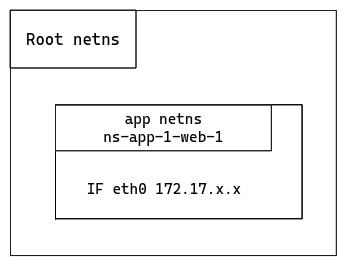
The application network namespace (labelled “app netns”) contains a single interface eth0 to communicate with the outside world, via the local Docker bridge. The only port exposed on the Scalingo network is the one defined in the environment variable PORT. Hence this is the only port usable to communicate with the application.
With the current setup, only web containers have a PORT assigned. Other container types cannot listen on any port.
The first requirement we want to satisfy is to group application containers in a private way. We want a customer’s containers to be in the same private network to enable container communication in a dedicated network.
VXLAN to Group Containers
The choice of VXLAN was not immediate. We first investigated various private network technologies. The reason why we eventually decided to use VXLAN is out of the scope of this article but it turned out to be the ideal solution for grouping containers in a private manner at Scalingo.
VXLAN is an already well known technology at Scalingo. When we worked on the databases high availability setup, we already used it to hide database nodes from the outside world. We open sourced the technology to dynamically create VXLAN private networks named SAND.
VXLAN (Virtual Extensible LAN) is a network virtualization technology that aims to overcome the limitations of traditional Layer 2 networks. VXLAN works by encapsulating Ethernet frames inside UDP packets, allowing the creation of virtual networks over physical infrastructure.
For our new Private Networks offering, VXLAN serves as the core technology to group containers. It ensures they are treated as if they belong to the same local network, even if they are spread across different shared virtual machines.
Using VXLAN in the context of Scalingo offers key benefits:
Scalability: it can scale up to 16 million logical networks, making it ideal for large container deployments.
Isolation: each VXLAN network is isolated from the others, ensuring that containers within one network cannot accidentally communicate with those outside it.
Network flexibility: it abstracts the physical network layer, allowing easy configuration for Software-Defined Networks (SDN).
Technically speaking, having the container inside a VXLAN consists of adding a new network namespace and a group of interfaces:
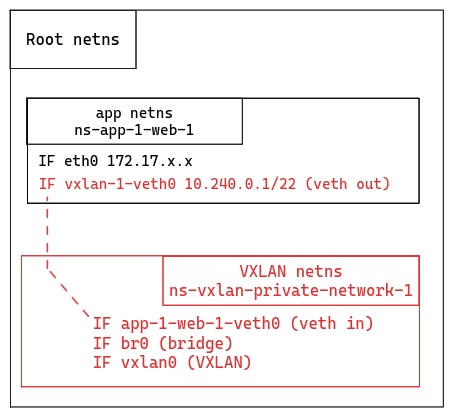
We created a network namespace for the VXLAN which contains a virtual Ethernet (veth) interface (app-1-web-1-veth0) to communicate with the interface inside the Docker container (vxlan-1-veth0).
This VXLAN also contains a bridge interface (br0). If a second container inside the same VXLAN is started on the same server, we would create a second veth in the VXLAN network namespace and also plug it to the bridge.
Last, there is a VXLAN interface (vxlan0) in charge of encapsulating/decapsulating the Ethernet frame inside the UDP packet and adding a VXLAN Network Identifier (VNI). In the VXLAN terminology this interface is named a VXLAN tunnel endpoint (VTEP).
One can note that it’s still possible for the application to communicate with the internet via the eth0 interface connected to the Docker bridge on the server.
This setup is a good foundation, but it does not implement all the requirements we have for the Private Networks product. Even though this is not yet usable, an evolution of the product will consist in adding the ability for a container to communicate in multiple private networks.
Getting Ready for Multi-Private Networks
In terms of architecture, the VXLAN setup is already ready to support a container in multiple private networks:
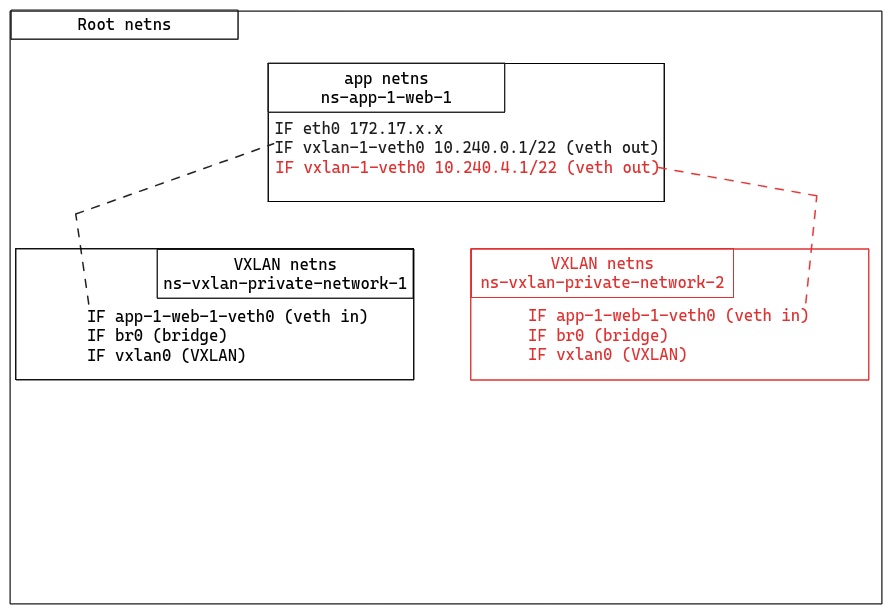
In terms of code, SAND wasn’t ready to support a container inside multiple private networks. This step doesn’t require a lot of work, and we are eager to offer the possibility to our customers to have a container inside multiple private networks!
Keeping Things More Private With Encryption
While VXLAN provides a way to group and route container traffic, it doesn't inherently offer strong security for the data in transit. This is where WireGuard, a modern VPN protocol, comes into play.
WireGuard is known for its simplicity, high performance, and cryptographic strength. WireGuard ensures that data traveling between containers is protected from eavesdropping or tampering. The protocol uses state-of-the-art cryptographic primitives (such as Curve25519, ChaCha20-Poly1305 and BLAKE2s) to deliver robust security with minimal overhead. Moreover, it is already available out of the box in all modern Linux kernels.
We want the application network namespace to have a single interface to communicate inside the private network. And this interface must encrypt all communications. In order to achieve this, we need to create one more network namespace:
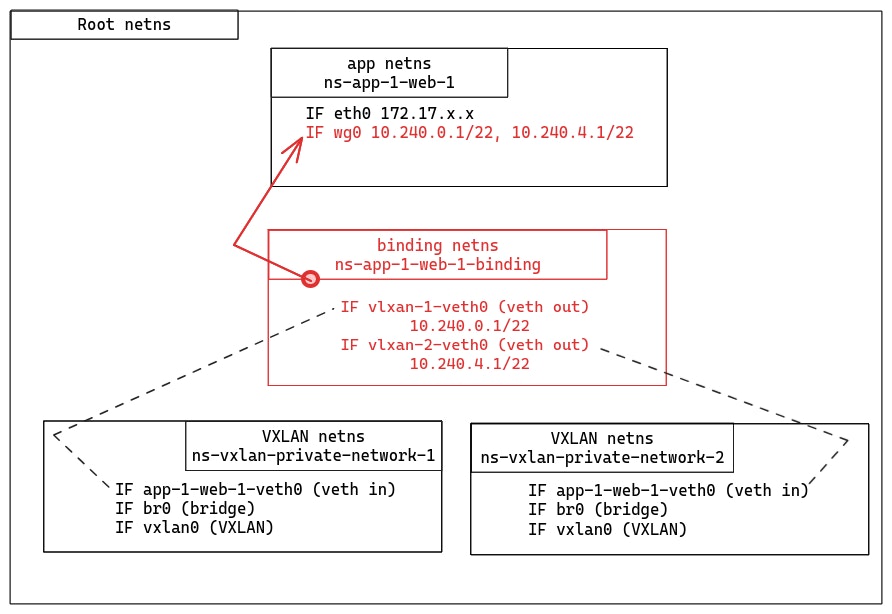
We introduce a new network namespace (“binding netns”) where the VXLAN veth are moved. Then there is a small magic trick we need to explain to understand how the WireGuard interface (wg0) communicates with the binding network namespace.
WireGuard has a unique feature: when a WireGuard interface is created, it remembers the namespace where it was initially created. Even if the interface is later moved to a different namespace, it will retain the memory of its original namespace. This is because the UDP socket which actually sends and receives encrypted packets is created in the original namespace.
In our setup, this means we create the WireGuard interface in the binding network namespace, then move it to the application network namespace. All clear packets sent in the WireGuard interface are forwarded encrypted via the UDP socket which remains in the binding network namespace.
Wrapping Up Everything
We described a complete setup with interconnected network namespaces to create encrypted private networks. Let’s wrap everything up with an example of an application with two container types: web and backend. In this example, we want to highlight how an IP packet travels from the web container type to the backend (IP address 10.240.0.2):
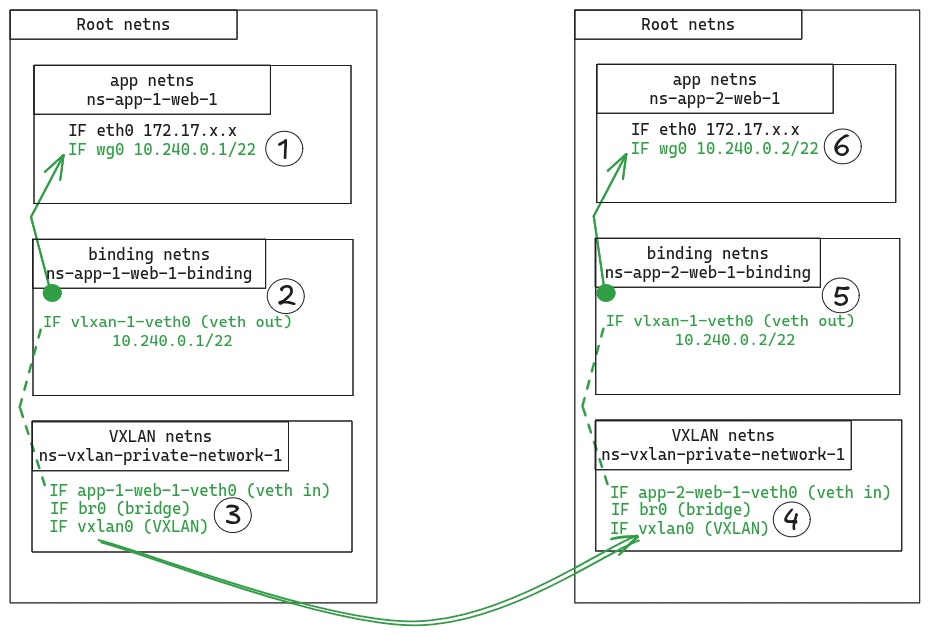
The application sends the IP packet through the WireGuard (wg0) interface (step 1). WireGuard maintains a list of the possible peers this container can communicate with, associated with their public keys. WireGuard uses the destination public key to encrypt the packet. The packet is encapsulated into a UDP datagram.
This datagram goes through the UDP socket which remained in the binding network namespace (step 2). A route table in the binding network namespace directs the datagram to the VXLAN network namespace through the interface vxlan-1-veth0.
The datagram is sent to the VXLAN interface (vxlan0) via the br0 one (step 3). The VXLAN interface receives an Ethernet frame which contains the UDP datagram. This datagram contains the original IP packet sent by the application. VXLAN encapsulates the received Ethernet frame into a UDP datagram that is sent to the destination VXLAN network namespace.
In the destination VXLAN network namespace, the Ethernet frame is decapsulated to get the WireGuard UDP datagram (step 4). It is sent to the binding network namespace through the app-2-web-1-veth0 interface.
The datagram is forwarded through the WireGuard UDP socket to be sent to the application network namespace (step 5). When received on the WireGuard interface (step 6), the datagram is decapsulated and decrypted to get the original IP packet. This packet is forwarded to the backend container.
Internal Domain Names
Based on this example, we understand it’s important for an application to determine the IP address of the other containers in the same private network. This is why we introduce internal domain names. An internal domain name is composed of the container number (optional), container type (optional), the application ID, the private network ID and a common internal network identifier (private-network.internal).
Here are some examples with an application ap-a71da13f-7c70-4c00-a644-eee8558d8053 and a private network pn-ad0fd6a1-d05e-40ea-bf63-c4f8a75a9d8c:
ap-a71da13f-7c70-4c00-a644-eee8558d8053.pn-ad0fd6a1-d05e-40ea-bf63-c4f8a75a9d8c.private-network.internal.DNS A records to the
webcontainers.webcontainers are the default containers contacted when using the application domain name (optional prefixes excluded).web.ap-a71da13f-7c70-4c00-a644-eee8558d8053.pn-ad0fd6a1-d05e-40ea-bf63-c4f8a75a9d8c.private-network.internal.DNS A records to the
webcontainers.1.web.ap-a71da13f-7c70-4c00-a644-eee8558d8053.pn-ad0fd6a1-d05e-40ea-bf63-c4f8a75a9d8c.private-network.internal.DNS A record to the first
webcontainer.worker.ap-a71da13f-7c70-4c00-a644-eee8558d8053.pn-ad0fd6a1-d05e-40ea-bf63-c4f8a75a9d8c.private-network.internal.DNS A records to the
workercontainers.1.worker.ap-a71da13f-7c70-4c00-a644-eee8558d8053.pn-ad0fd6a1-d05e-40ea-bf63-c4f8a75a9d8c.private-network.internal.DNS A record to the first
workercontainer.
These domain names can be inferred by knowing the application ID, the private network ID and the application formation. The application and private network IDs are injected in the application environment at runtime.
You can also list them using the Scalingo CLI:
Conclusion
Voilà, this is the (rather technical) story of how we offer our customers a new Private Networks product. Add a domain name for all containers in the private network which resolves to the IP address inside the private network, and this product lets you deploy web applications that are not exposed on the internet.
Our new Private Networks solution, built on the combined power of VXLAN and WireGuard, offers an innovative, scalable, and secure networking layer for your applications deployed on the Scalingo platform.
The Private Networks product is designed to provide secure and seamless communication between your applications. A neat consequence of this new product is that you can now deploy web applications that are not exposed on the internet. Best of all, it’s easy to use and fully integrated with our Platform-as-a-Service offering, so you can focus on what matters most: building and running your applications
Interested in Private Networks? Contact our support team via the chat embedded on the dashboard or by email at support@scalingo.com.
Stay tuned to our blog for updates on future developments regarding this feature, more is coming.

Étienne Michon
Étienne Michon was one of Scalingo's first employees. With a PhD in computer science, Étienne takes care of Research and Development at Scalingo. He also regularly contributes to this blog with technical articles.
Stay Updated
Get articles and platform updates in your inbox.
Ready to Deploy with Confidence?
Experience zero-downtime deployments, intelligent auto-scaling, and fully managed infrastructure. Start deploying your applications on Scalingo today.
No credit card required • Deploy in minutes • Cancel anytime