6 min read
From CodeShip to GitHub Actions: Rebuilding CI at Scalingo
When CodeShip shut down, we migrated over 100 repositories to GitHub Actions. Along the way, we redesigned how we share CI logic, standardized workflows across projects, and built a platform that's easier to maintain and evolve.

Last year, we received the kind of announcement every engineering team dreads: CodeShip, the CI platform we had relied on for years at Scalingo, was shutting down, with a hard deadline fixed for January 31st 2026.
This gave us little time to migrate the CI pipelines powering over one hundred of our repositories to a replacement system, all without slowing development, breaking existing workflows, or disrupting ongoing deployments. Needless to say, this was not exactly how we had planned to spend the end of the year.
But as we started digging into the problem, it became clear that this would also be an opportunity to revisit parts of our CI setup that had gradually become heavy to maintain over time. Over the years, sharing CI logic across repositories had become increasingly complicated, testing CI changes safely was difficult, and several custom workarounds had slowly become part of our day-to-day workflow.
Migrating away from CodeShip was the opportunity we needed to rethink that entire setup.
CI/CD at Scalingo
Like many engineering teams, we rely heavily on CI/CD to automate software validation and safely deliver code changes.
Every code change pushed to our repositories goes through a series of automated checks before it can be deployed. This helps us catch regressions early, keep workflows consistent across projects, and reduce the amount of manual validation required from engineers.
On the CI side, our pipelines automatically:
run unit and integration tests,
execute linters,
verify that code changes do not introduce regressions,
and enforce security checks, via code analysis.
At the time of the migration, all of these checks were executed through CodeShip.
On the deployment side (CD), Scalingo relies on several automated deployment mechanisms:
some services are deployed automatically through Scalingo applications using GitHub integration, which is a feature we also provide to our customers,
others are deployed directly on our servers through internal tooling using Chef.
As CodeShip was only responsible for the CI part of the pipeline, the deployment side of the stack remained unchanged throughout the migration.
The Limits of Our CodeShip Setup
CodeShip had been part of our stack for years, and at the time, the choice made a lot of sense. In the early days of Scalingo, much of our stack and engineering culture came from the Ruby ecosystem, where CodeShip, previously known as Rails on Fire, was a very popular CI solution.
And to be fair, it worked well for us for quite a long time.
But as the platform grew, some limitations started becoming harder and harder to work around operationally.
The biggest pain point for us was sharing CI logic across repositories.
CodeShip did not provide an easy way to share scripts used to run unit tests or linters between projects. And with hundreds of repositories, duplicating CI scripts repository by repository became very difficult to maintain.
To work around this limitation, we built our own system:
CI execution scripts were stored in object storage,
repositories dynamically downloaded those scripts during CI execution.
For a while, this worked reasonably well. It allowed us to centralize CI logic instead of modifying every repository individually.
But over time, the workaround itself started creating new operational headaches:
script updates had to be manually uploaded,
permissions were time-consuming to manage,
uploads could occasionally be forgotten,
and any modification instantly impacted every repository using the shared script.
Testing CI changes safely also became tricky. A mistake in a shared script could break pipelines across dozens of repositories almost immediately.
The setup had gradually become fragile, difficult to evolve safely, and increasingly frustrating to maintain day to day.
Why We Chose GitHub Actions
When CodeShip announced its shutdown, they proposed a migration path toward CloudBees one of their parent company’s other products. But since we had to migrate anyway, we decided to take the opportunity to step back and fully rethink how we wanted to structure CI across the company.
After evaluating several alternatives, we decided to move to GitHub Actions, which seemed the right fit for us for multiple reasons:
Native GitHub Integration
Part of the appeal was obvious: all our repositories already lived on GitHub, so workflows could integrate directly with:
pull requests,
pushes,
tags,
permissions,
and repository settings.
Because GitHub Actions is built directly into GitHub, the overall developer experience also felt much more integrated and convenient than using an external CI platform.
Reusable and Safer CI Workflows
One of the biggest improvements for us was how GitHub Actions handled reusable workflows and shared CI logic.
GitHub Actions made it much easier to create reusable actions and workflows directly integrated into the platform itself.
Instead of duplicating scripts across repositories or relying on custom object-storage-based workarounds, we could:
centralize workflow logic,
compose workflows from reusable actions,
and progressively test CI changes before deploying them more broadly.
With our previous setup, a modification to a shared CI script could instantly impact every repository using it. With GitHub Actions, workflows and actions are versioned and branchable, making it possible to test changes safely on isolated repositories before wider rollout.
This branching and versioning model also made the migration itself much easier to manage progressively. Instead of updating every repository at once, workflows and reusable actions could be migrated incrementally and validated repository by repository.
A Strong Ecosystem
Another strong point was the GitHub Actions ecosystem itself.
GitHub Actions allows workflows to be composed from actions published by the community or directly by software vendors. Many of the tools we already relied on already provided official GitHub Actions integrations, which made them straightforward to reuse in our workflows.
This allowed us to assemble workflows from existing building blocks instead of maintaining custom scripts for everything internally.
In the end, GitHub Actions wasn’t just a replacement for CodeShip. It gave us a much cleaner way to share, compose, and evolve CI workflows across repositories.
How GitHub Actions Works
GitHub Actions is GitHub’s native automation platform for CI/CD workflows.
At its core, everything revolves around workflows: YAML configuration files stored directly inside repositories under: .github/workflows/
Each workflow defines an automated process that executes one or more jobs.
Workflows are event-driven. They are triggered automatically whenever a specific event occurs on a repository, such as:
opening a pull request,
pushing code,
creating a Git tag,
or publishing a release.
A workflow is then composed of several smaller building blocks:
jobs, which define groups of tasks to execute,
steps, which define individual execution stages inside a job,
and actions, which are reusable pieces of logic shared across workflows.
A step can either:
execute a shell script,
or call another GitHub Action.
All of this runs on what GitHub calls a runner, a server responsible for executing the workflow.
The example below shows a very simple workflow running Go unit tests on every pull request.
Centralizing CI Logic at Scalingo
To avoid duplicating CI logic across repositories, Scalingo maintains a dedicated repository containing reusable GitHub Actions: github.com/scalingo/actions
This repository contains the shared actions used across several technologies and projects at Scalingo, including Go, Ruby, JavaScript, and Lua.
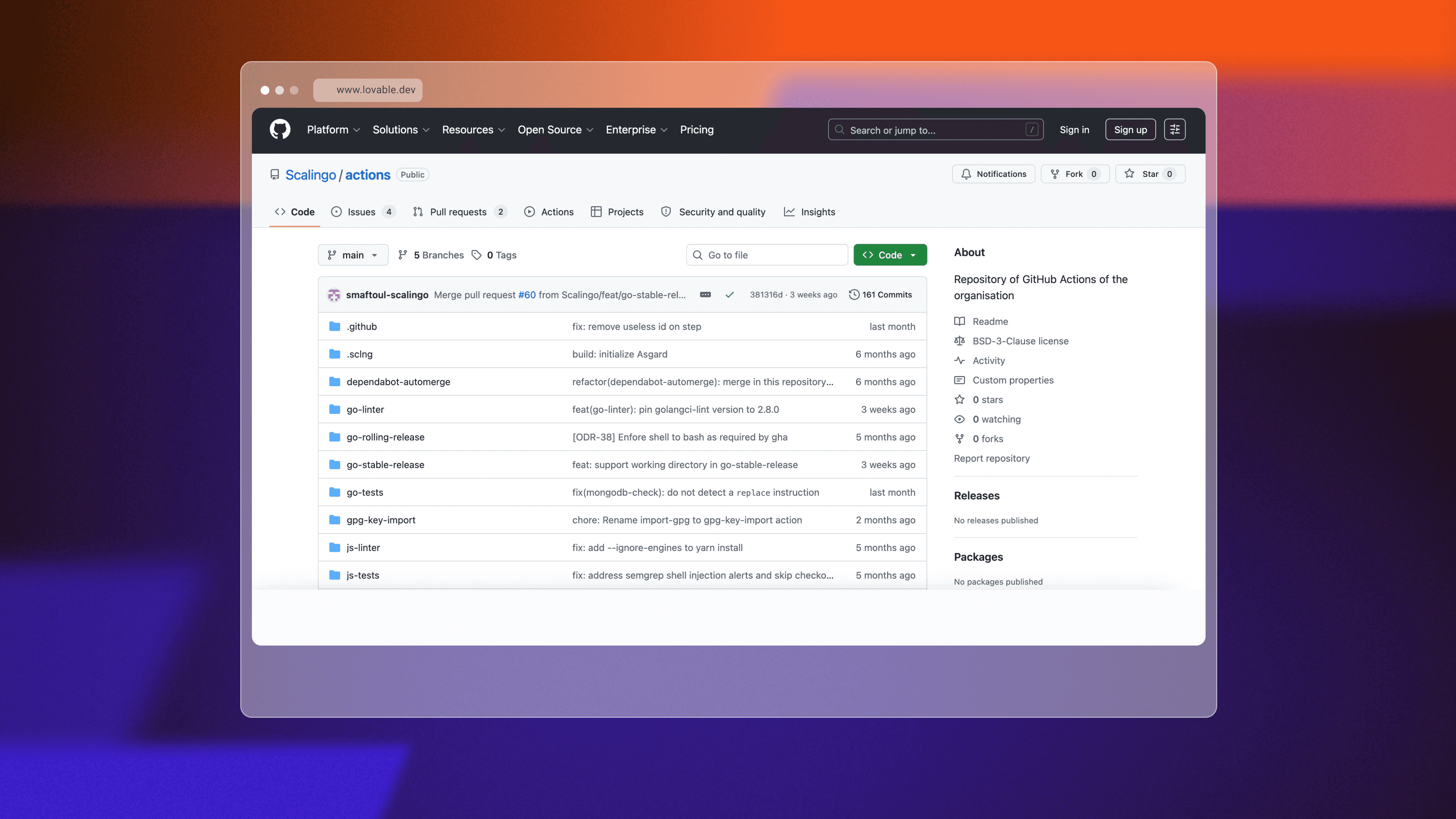
Repositories keep relatively small workflow files and delegate execution to reusable shared actions.
For example, workflows can simply reference actions such as:
or:
A Go Workflow Example
Go is one of the languages used heavily at Scalingo, and our Go repositories all follow a shared CI workflow structure.
The workflow itself is relatively concise.
It defines:
the events triggering CI,
repository permissions,
and two separate jobs:
a linter job,
and a test job.
The workflow is triggered:
when a pull request is opened,
and when code is pushed to the main production-related branches.
The linter job only runs on pull requests, while unit tests also run on pushes to the main branches.
The workflow also defines explicit repository permissions. In this case, only read access is granted because the jobs only need access to the repository source code.
Instead of embedding shell scripts directly inside the workflow, the jobs delegate execution to reusable actions stored in the Scalingo/actions repository.
One particularly useful aspect of this model is that actions are versioned by branch.
The @main suffix tells GitHub Actions to use the version of the action stored on the main branch. But during development, workflows can temporarily reference another branch instead.
All of this makes it possible to test CI modifications safely on isolated repositories before rolling them out more broadly, something that had been much harder with our previous CodeShip setup.
The workflow itself stays relatively small because most of the actual CI logic lives inside reusable shared actions. One of the most important of these shared actions for Go projects is go-test, which handles most of the setup and orchestration required before unit tests can run.
Inside the go-test Action
The go-test action itself is implemented as a composite GitHub Action.
Rather than simply executing go test, the action orchestrates several setup and validation steps automatically.
The workflow:
checks out the repository source code,
installs the Go toolchain,
determines which external services are required,
conditionally starts those services,
executes optional repository-specific setup hooks,
and finally runs the Go unit tests.
The action begins by calling GitHub’s official actions/checkout action, which clones the repository code onto the runner executing the workflow.
It then installs the dependencies required to build and test Go applications.
One particularly interesting aspect is how external services are handled automatically. Some Go projects at Scalingo require services such as MongoDB, etcd or Redis during test execution.
To support this, the action includes detection scripts that inspect project dependencies and determine whether these services should be started.
For example, if MongoDB dependencies are detected inside the Go project, the workflow automatically starts a MongoDB instance before running the tests.
This behavior can be overridden manually through workflow inputs when needed.
Before executing tests, the action also checks for an optional repository-specific setup script:
If this script exists inside the repository being tested, it is executed automatically before running the tests. This allows individual projects to customize CI behavior for specific needs without modifying the shared action itself.
Finally, the workflow executes the Go unit tests through:
with additional parameters specific to Scalingo’s internal setup.
Standardizing CI Across Repositories
Although the implementation details differ slightly between technologies, the same overall approach is also used for JavaScript, Ruby, and Lua projects.
This ended up being one of the biggest improvements of the migration for us.
Instead of maintaining large amounts of duplicated CI logic repository by repository, we now have a shared foundation of reusable actions that can evolve progressively over time.
Repositories stay relatively small, CI behavior remains more consistent across projects, and workflow changes can be tested much more safely before broader rollout.
In the end, the migration was not just about replacing CodeShip. It was also an opportunity to rethink how CI workflows should be shared, maintained, and evolved across Scalingo.

Étienne Michon
Étienne Michon was one of Scalingo's first employees. With a PhD in computer science, Étienne takes care of Research and Development at Scalingo. He also regularly contributes to this blog with technical articles.
Stay Updated
Get articles and platform updates in your inbox.
Ready to Deploy with Confidence?
Experience zero-downtime deployments, intelligent auto-scaling, and fully managed infrastructure. Start deploying your applications on Scalingo today.
No credit card required • Deploy in minutes • Cancel anytime