Introducing New Database Backup Procedure
You are now able to configure the time when the backup of your database is done.

We upgraded how we deal with database backups. Whatever your database engine, you are now able to configure the time when the backup of your database is done. You can also manually schedule a new backup.
The procedure to backup all the databases on Scalingo was to schedule the backups at a specific time during the night. It had two drawbacks. First, "during the night" has no meaning with clients all around the world. Triggering a backup at 3:00 AM CEST is obviously not "during the night" for customers at the opposite side of the world. Second, we scheduled a backup on all databases on the platform at a specific date but this operation took some times. With the platform growth, all these backups ended up taking so many times that the last backups finished six hours after we scheduled it.
What is New?
Periodic Backups
In order to improve the database backups procedure, we give you more control over the backups time. First of all, you can now choose when will the periodic backup be automatically executed. The backup can take resources from the normal operations. By choosing when to execute the backup, you can select the time when your database is more idle.
Periodic backups are not applicable to Free/Sandbox plans as they do not include any SLA.
Manual Backups
Moreover, you may want to occasionally ask for an extra backup, outside of the periodic procedure. For instance, before doing a major change in your application. This is now possible via a simple click on the web dashboard, a simple CLI command or a simple API call.
Manual backups are not applicable to Free/Sandbox plans as they do not include any SLA.
Updated Tooling
Web Dashboard
All these changes require an updated dashboard. Here is what it looks like:
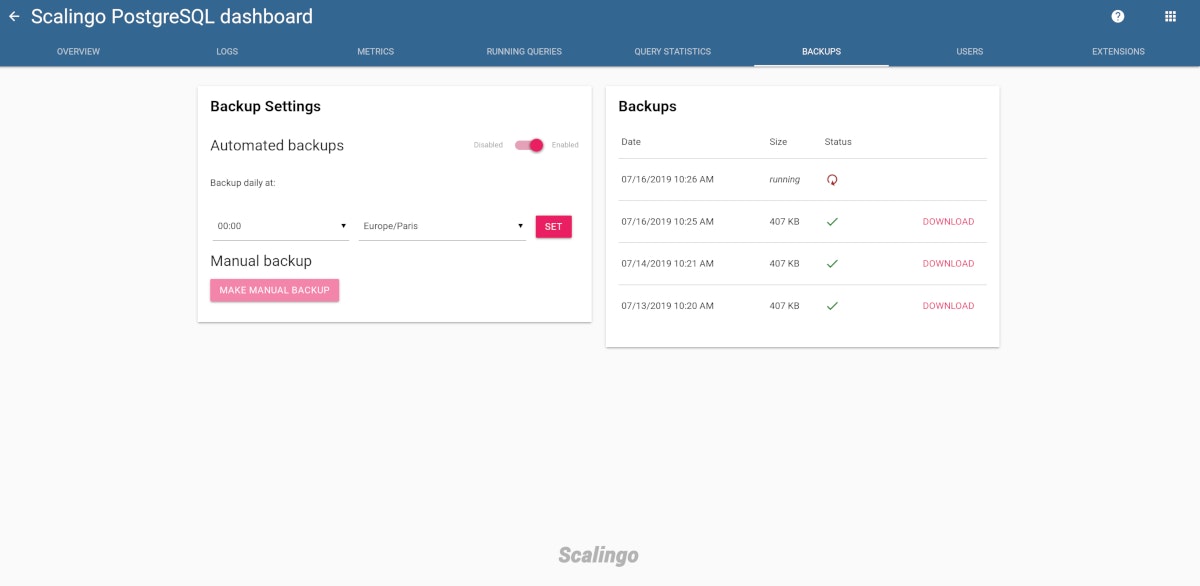
The left card displays the new configuration possibilities. The periodic backups can be disabled if one does not want it. If enabled, it is possible to choose the time of the day to run the backup. The button to manually schedule a new database backup is also on this card. The right card is the list of backups you can download.
CLI
The Scalingo CLI has been updated to let you do the same operations as on the web dashboard:
In the examples above --scheduled-at 3 will use your local timezone.
API
The database API has been updated. You can find all the information in our developers documentation.
New Backups Retention Policy
The backups retention policy has also been updated. We now keep the last 30 backups. Whatever how they have been taken, via periodic procedure or manually, the last 30 backups are still downloadable. All existing databases have been migrated to this new backup procedure. Newly created databases will also automatically use it.
Erratum: after hearing some customer feedbacks, we decided to go for the backup retention policy described below.
Manual Backup Retention Limits
There is a limit to the number of manual backups that you can retain. That number is based on your database plan.
If you’ve reached this limit and need to take additional backups, the capture command will automatically expire the oldest manual backups before capturing a new one.
Plan | Backups Retained |
|---|---|
Sandbox/Free | N/A |
Starter | 10 |
Business | 50 |
Periodic Backup Retention Limits
Periodic backups have a different retention policy compared to the manual backups. This policy is also based on the database plan. For all plans, a daily backup is retained for the last 7 days. That means that 7 backups will exist, one for each of the last 7 days. A weekly backup means that only one backup is saved over a 7-days period. A monthly backup means that only 1 backup is saved over the course of a month. Based on current limits, for example, a Business 1G would have 12 monthly backups, one for each of the last 12 months.
Plan | Weekly Backups Retained | Monthly Backup Retained |
|---|---|---|
Sandbox/Free | N/A | N/A |
Starter | 4 weeks | 0 months |
Business | 8 weeks | 12 months |
We are still working hard on our database offer, stay tuned for more great news (have you heard of PostgreSQL high availability ;)!
Photo by Jan Antonin Kolar on Unsplash

Étienne Michon
Étienne Michon was one of Scalingo's first employees. With a PhD in computer science, Étienne takes care of Research and Development at Scalingo. He also regularly contributes to this blog with technical articles.
Stay Updated
Get articles and platform updates in your inbox.
Ready to Deploy with Confidence?
Experience zero-downtime deployments, intelligent auto-scaling, and fully managed infrastructure. Start deploying your applications on Scalingo today.
No credit card required • Deploy in minutes • Cancel anytime