3 min read
MySQL 8.4 LTS is now available
We are thrilled to announce the availability of MySQL 8.4 LTS on our platform! This release is a major milestone for our Scalingo for MySQL service, bringing a set of improvements focused on stability, performance, and security.
We are thrilled to announce the availability of MySQL 8.4 LTS on our platform! This release is a major milestone for our Scalingo for MySQL service, bringing a set of improvements focused on stability, performance, and security.
In this article, we will take a closer look at what’s new in MySQL 8.4, from the new LTS release model, to security updates and removal of deprecated features defaults. We will also walk you through the simple upgrade process so you can start benefiting from these improvements immediately.
A clear migration path before MySQL 8.0 end of support
MySQL 8.0 is expected to reach end of life in April 2026, which makes upgrade planning a priority for production and compliance.
MySQL 8.4 LTS is now available on Scalingo to provide a long term supported target version, so you can test and migrate in the coming months, ahead of the MySQL 8.0 end of support.
What’s new in MySQL 8.4 LTS?
A new LTS release cycle
While MySQL 8.0 benefited from a long support window, MySQL 8.4 is the first version explicitly released as an LTS under MySQL’s new lifecycle model.
On Scalingo, we only ship MySQL LTS releases. MySQL 8.4 is the current LTS line, and it is the recommended target for production upgrades as MySQL 8.0 approaches end of support. The next LTS series will move to MySQL 9.x.
For more details on the new MySQL release lifecycle, refer to the official MySQL documentation.
Safer authentication defaults
Starting from MySQL 8.4, the legacy authentication plugin mysql_native_password is disabled by default. At Scalingo, we kept this plugin enable for now as some customers are still waiting to be migrated but it should disabled in our next updates.
Stays reassured as mentioned in our previous MySQL release, new databases coming from 8.0 and newer are already using the new password method.
This will ensure a stronger security by default and block the creation of new users using this authentication method.
Deprecated features removed
MySQL 8.4 enforces stricter rules on some legacy or ambiguous schema definitions:
AUTO_INCREMENTonFLOATandDOUBLEcolumns is no longer supported. Attempting to use this modifier inCREATE TABLEorALTER TABLEwill now return an error: ERWRONGFIELD_SPEC.Index prefix columns are no longer allowed in partitioning keys. This feature was deprecated in MySQL 8.0.21 and previously generated a warning. In MySQL 8.4, attempts to use such columns in partitioning keys will now fail with an error.
If your database schema relies on features that are no longer supported (such as AUTO_INCREMENT on FLOAT or DOUBLE columns, or prefixed columns in partitioning keys), the upgrade will be stopped by our system.
Upgrading to MySQL 8.4 LTS
Upgrading your databases to MySQL 8.4 LTS is straightforward. Just click the Upgrade button on your database dashboard. However, it is advised to follow our best practice guide before upgrading.
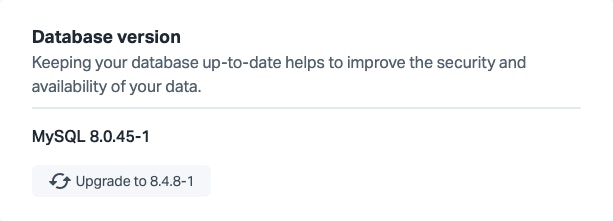
For a short transition period, new MySQL databases will still be created on MySQL 8.0 LTS. This is intentional and allows you to create test instances, validate the upgrade process, and run migration checks before upgrading your production databases. The upgrade process is designed to be seamless for Business instances, with no expected downtime, and typically causes only a few seconds of downtime for Starter plans (depending on the database size).
Before upgrading to MySQL 8.4 LTS, the dashboard will first prompt you to upgrade your database to the latest MySQL 8.0 patch release. This ensures a smooth and supported upgrade path.
As always, if you have questions or need assistance during the upgrade process, our team is ready to help. Simply reach out via your dashboard, and we will be happy to guide you.

Cédric Thomas
Cédric is Software Engineer at Scalingo in the Infrastructure Team.
Stay Updated
Get articles and platform updates in your inbox.
Ready to Deploy with Confidence?
Experience zero-downtime deployments, intelligent auto-scaling, and fully managed infrastructure. Start deploying your applications on Scalingo today.
No credit card required • Deploy in minutes • Cancel anytime